
Joomla - How to reset hit statistics
To reset hit counter of one articles:
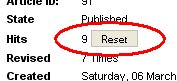
In joomla admin web interface go into the Article Manager, open the article and press 'Reset' button near Hit number:
To reset hit counter of all articles:
Step1: Enable access for remote computer to your MySQL server from your host admin interface (cPanel: go to Databases/Remote MySQL/Add Access Host, WebMin: go to Edit Databases/Remote Hosts). Enter your IP address (IP address of your local computer: find out your IP at www.whatismyip.com), or you can enter whole range of IP addresses (not recommended) using '%' wildcard (e.g. 93.143.%.%)
Step2: Download SqlYog and install on your computer, setup connection: host=your site domain (e.g. mydomain.com), user= mysql user (usually same as ftp and web admin username). Connect to your database.

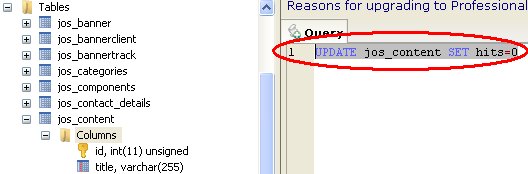
Step3: Select Joomla database (usually has suffix _joomla) and in query window copy/paste this:
UPDATE jos_content SET hits=0
use F9 to execute:
Note: if you wish to reset hit stats for one particular article use SQL:
UPDATE jos_content SET hits=0 WHERE id=article_id (find out article id inside Joomla admin manager)