
Joomla - How to show module inside article content
Module can be shown only in predefined positions of currently used template, e.g. left, right, top, footer, etc. Those predefined positions can be reveled if you reload your Joomla website and add ?tp=1 at end of URL (e.g. mysite.com/index.php?tp=1)
Sometimes there is a need to show modules inside article itself, e.g. you wish to include Social BookMark module in your article. So let's explain that:
Step1: in Extensions/Module manager edit module that you wish to show inside your article content
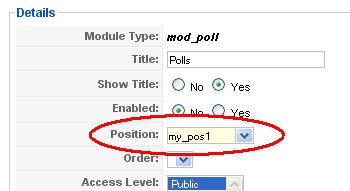
Step2: Create your own unique Position by manually entering custom name of the position (e.g. my_pos1) inside Position edit-box:
Step3: Go to Extensions/Plugin Manager and check that you have enabled plugin called Content - load module, change settings if you wish.
Step4: Write an article and at position where you want to put your module type: , in this case you will write . When article is shown instead of your module will be shown.
See more detailed descrption at JoomlaSpan.com