
Joomla - How to customize module appearance
To customize module appearance, define own CSS class inside current template.css named with prefix: module + your own suffix. E.g.
.module_sheeponline
{
font-family:Georgia,century gothic, Arial, sans-serif;
font-size: 12px;
margin: 20px 14px 0px 14px;
background: #CC6A10;
border: 1px solid black;
text-align: center;
color:white;
}
Then go to the module that you wish to customize and apply stylesheet and in put your own class suffix (_sheeponline in this case) in the Module Class Suffix entry box:
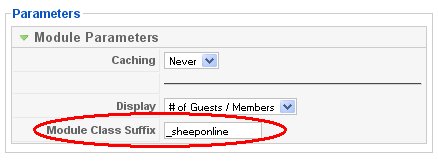
In this example I've change appearance of the default Who Is Online module. I was not happy with statement which begins as: "We Have # guests online", so I've changed this default text in languages/en-GB/en-GB.mod_whosonline.ini: WE HAVE= and GUEST=%s sheep, GUESTS=%s sheep's. End result is this:

Note: you can customize appearance of every module in Joomla