
Joomla - How to enable friendly URL (Aliases)
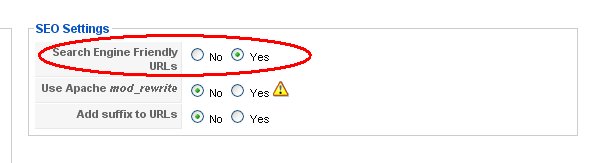
By default Joomla uses cryptic format to link internal articles such as: index.php?option=com_content&menuid=56&itemid=89 This link is permanent and can be bookmarked, but it's not very nice looking and search engines can have problems tracking those URL. When you enable friendly URL's in Site/Global Configuration, your URL's wil be formatted by use of article and menu item aliases. So if you wonder why aliases are for, now you know why. So your URL will look something like this: mysite.com/index.php/article_alias or if article is in submenu then parent menu alias will be used: e.g. mysite.com/index.php/parent_alias/article_alias
Warning 1: Joomla allows to use same alias for more then one article/menu and this can lead to confusion as you never know what article will be shown.
Warning 2: When you change article alias, every internal link to that article mus be changed too, so when linking internal articles use non-firendly URL syntax. See how to link internal articles.
See list of all Joomla mini how to's from this site