
Joomla - How to customize home page
First to clear some things: Front Page is NOT same as Home page:
In Joomla Home page is menu item that has default check box set in Menus/Menu Item manager. It can be only one menu item defined as default (home page), and in Menus dropdown list, menu that contains default menu item is marked with star.
Front Page is special front page layout (that can contain multiple articles) that can be assigned to any menu item and it is usually default menu item but it's not rule. So any article that contains Front Page enabled will automatically appear in the menu item which is defined with Front Page layout. By default Joomla comes with Home menu item declared as default (home page) of front page layout.
How to define custom home page
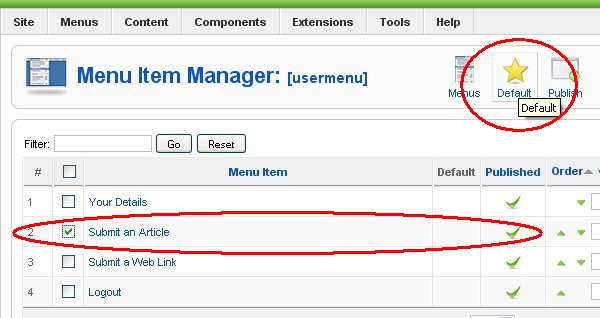
Step1: From Menus dropdown list select menu and inside Menu Item Manager select menu item that you wish to declare as Home page and click on big yellow star (Default).
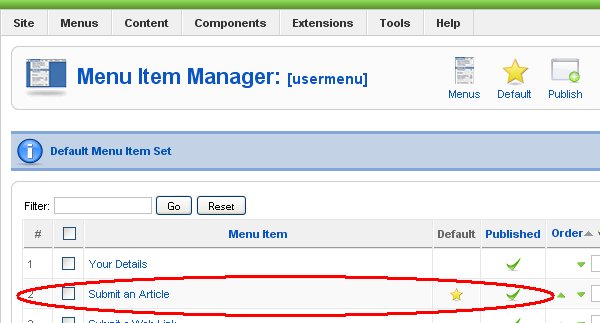
Step2: For example 'Submit A Article' from 'usermenu' is now declared as default (home page). You can see small yellow star beside menu item name.
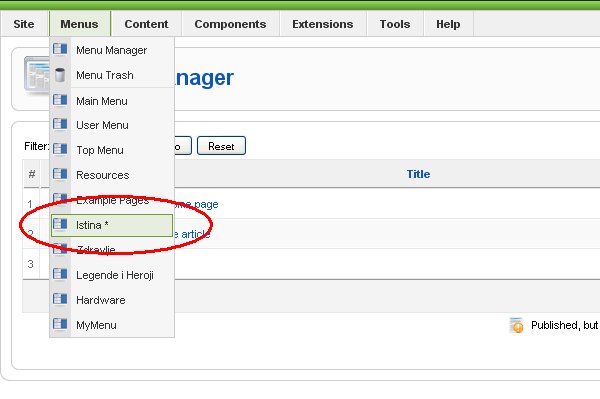
Step3: When you inspect dropdown list that appear when you click on Menus, you will see a little star near name of menu which contains default menu item, in our case 'usermenu'.
See list of all Joomla mini how to's from this site